


Backup My Org version 1.5 is here, and it brings one of the biggest visual and workflow refreshes the product has seen in a while. Alongside a redesigned client-side interface, this release rounds out item type coverage, gives admins better visibility into what’s happening in their logs, and makes it easier than ever to move a Backup My Org installation, license, or configuration to a new environment.
This update also carries a long list of improvements to reliability, security, and restore accuracy, plus dozens of bug fixes across backup, restore, and post-processing.
New Features
New Client-Side Interface with Dark Mode
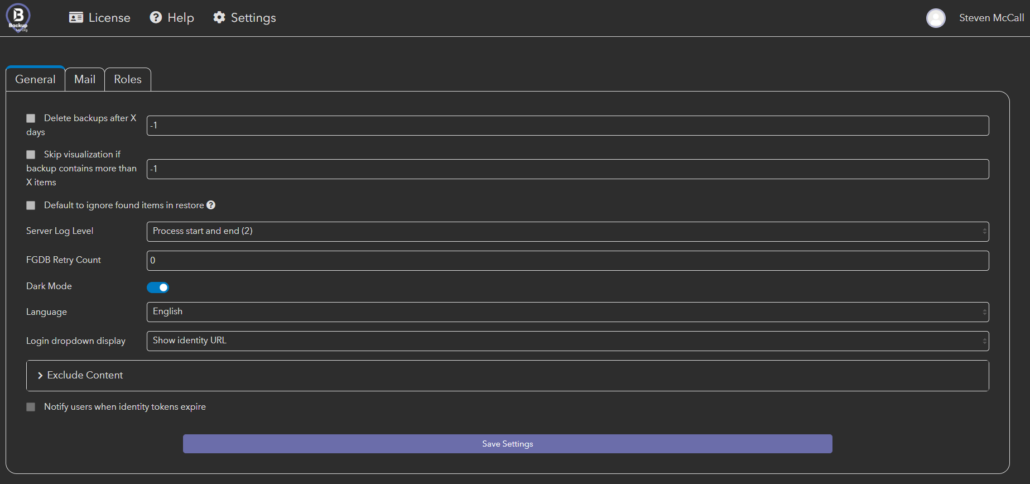
Backup My Org’s client-side interface has been rebuilt from the ground up, and it now includes a dark mode option for anyone who spends long hours in the app. The new interface carries the same functionality you rely on, just refreshed with a cleaner look and feel.
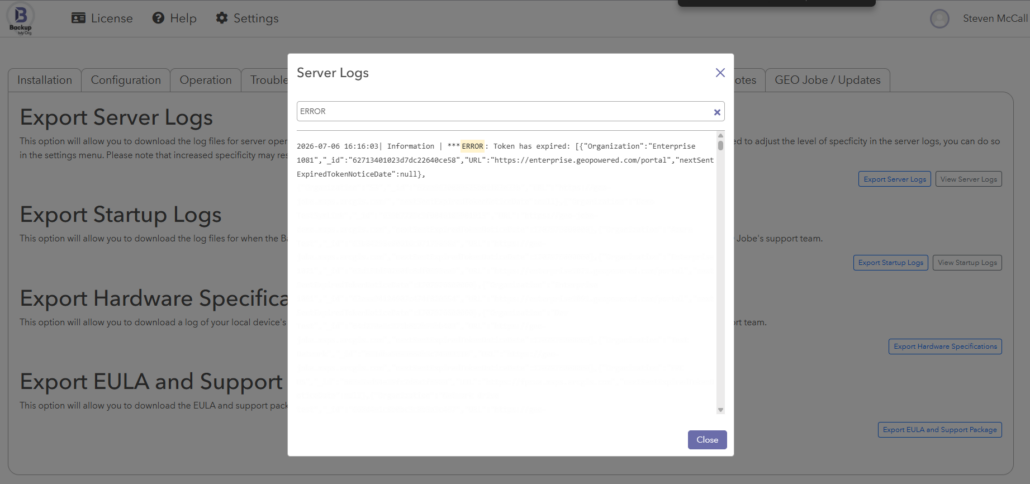
Searchable Log Viewer for BMO and Server Logs
Digging through backup and server logs just got a lot faster. The new searchable log viewer lets you find exactly what you’re looking for without scrolling through pages of entries, which is especially handy when you’re troubleshooting a specific job or tracking down an error.
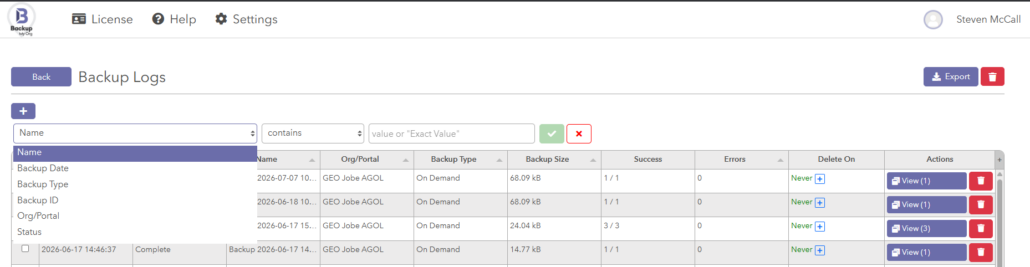
New Filtering on All Logs
New detailed filtering is now available on all log and individual log pages.
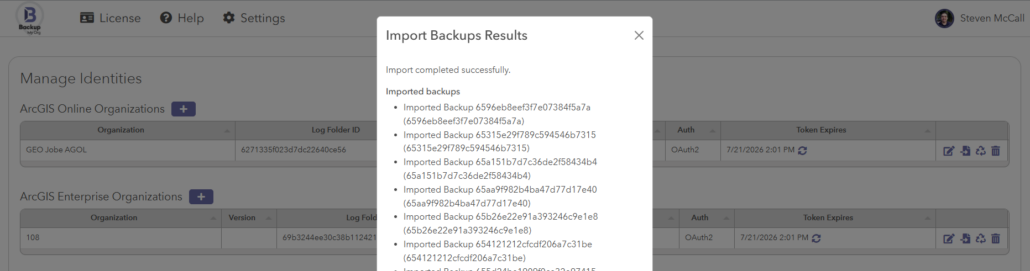
Import Backups from the Manage Identities Page
You can now import backups directly from another Backup My Org server or backup folder right from the Manage Identities page. This is a great option for anyone consolidating servers or migrating to a new environment. For a full walkthrough, check out our K-base article on importing a backup from another BMO server or folder.
IIS-Mode for the Client-Side Interface
Backup My Org’s client-side can now run from IIS, meaning you can access it at something like domain.com/backupmyorg instead of domain.com:8500, utilizing the certificates of IIS. More details are available in our K-base article on running Backup My Org in IIS mode.
Backup and Restore for Custom Experience Builder Widgets
Organizations building out custom widgets in Experience Builder can now back up and restore them right alongside the rest of their Experience Builder content, so custom functionality doesn’t get left behind during a migration.
Support for New Item Types
- New item type support for Pipeline items
- New item type support for Notebook items
Additional Features
Backup My Org 1.5 also includes these additional new features:
- Added localization support
- Added Quick Filter for items in User Folders
- New hosted filter for item selection
New Improvements
Authentication and Access
- Refactor of the roles system to support multiple login methods
- Support for MongoDB certificates, more info in our MongoDB TLS certificate K-base article
- Added Role-based export permissions
- .NET 4.8 check on startup
Backup Reliability
- Backups can now be cancelled during the preprocessing stage from Backup Logs
- MAX_CONCURRENT_BACKUP_RETRY_FETCH now defaults to MAX_CONCURRENT_FETCH or 5
- Added the ability to set a separate max concurrency for backup retries via MAX_CONCURRENT_BACKUP_RETRY_FETCH in Nodeconfig.json
- Option to automatically run a backup retry a set number of hours after a backup finishes, configurable through the new automaticallyRetryBackupErrors Nodeconfig options
- Additional deleteTempItems handling
- Prevents Backup My Org from crashing when MongoDB is down
Restore and Rewiring
- Ignore Found Items option added in both restore settings and global settings
- Remove or replace invalid characters in layer names before initial publish, with a Nodeconfig option to replace them with underscores
- Config options to remove special characters from service names during restore
- Improvements to Generic item rewire
- Added the ability to name restores
- Added restore status CSV report to Restore Logs
- Added a wait period for pulling the service definition of a newly published large service, with configurable retry count and interval
- In AGOL, whitespace is now allowed in service names and titles
Logging and Diagnostics
- Server-side debug log refactor
- Client-side authentication debug logging, enabled via logRoleLogin in html/config.json
- Additional logging for Hub Site Application actions
- Added error handling to getFilesizeInBytes calls to catch cases where a save reports no error but no file was actually saved
- Additional logging and error handling for individual restores and restored users, via the logIndividualUserRestore config option
- Zip path column added as a hidden option in the backup logs single view
Security
- Code improvements addressing reflected JavaScript, HTML code injection, and XSS vulnerabilities
- Improved security for HTML file serving
Interface and Workflow
- Wizards now more clearly show when a step can be skipped because no action is required
- New dashboard interface for the home screen
- Added option to delete multiple logs in backup logs
- Added a check to confirm an item type isn’t null before adding it to the item type store
- Now shows all rewire options in postprocessing rewire config when showAllRewiringOptions is enabled
- Added SKIP_QUICK_FILTER_REFRESH_CACHE option to force-skip refreshing the quick filter cache
- Added “Layer does not support attachments” alongside the existing “Attachments are not enabled for this layer” check
- Improved automatic detection for removeInvalidServiceNameCharacters and removeInvalidServiceLayerNameCharacters
Mail and Connectivity
- Added CC and BCC functionality to the mailer
- Added Proxy Settings for BMOfetch, more info in our proxy settings K-base article
External License Transfer
Moving Backup My Org to a new machine is easier now with external licensing. You can simply move your BMO-geojobe.license.txt file to the new installation to transfer your license; no need to reach out for a new license file.
Bug Fixes
Restore Workflow
- Fix for Experience Builder not restoring
- Fix for Feature Service View restoration
- Fix for individual restore not displaying items correctly
- Fix for restoring public images
- Fix for restore symbology not being published correctly when creating a new item
- Fix for rewiring issues in post processing
- Fix for rewiring layers with unusual characters, which may resolve layer rewiring issues more broadly
- Fix for restore rewiring failing inside embedded HTML fields
- Fix for Table IDs changing during restore
- Fix for Survey123 results sharing not being retained during form cloning
- Fix for changes to typeKeywords between ArcGIS versions preventing feature service settings from updating
Authentication and Login
- Fix for unable to get email notification on scheduled scan
- Fix for IIS mode login OAuth issue
- Fix for OAuth callback for IIS mode
- Fix for IIS mode authentication
- Fix for IWA-based ArcGIS authentication
Client-Side
- Fix for “Server is Closing Connection” error on client-side
- Fix for Server Log download in IIS mode
- Client-side warning for lack of .NET 4.8
Quick Filters and Identities
- Fix for itemsbytype quick filter OR filter
- Fix for initial quick filter method on quick filter loading to match the saved method
- Quick Filter backup confirmation: removed unused cards
- Fix for missing identity being passed into checkItemExists
- Fix for referenceError in fetching identities
- Fix for Backup Quick Filters not clearing dropdowns when running a second backup with a quick filter
- Fix for Mail Settings not populating for Azure
- Fix for Azure mail scheduled attachments and test mail sender
- Fix for awaitDrain CSV attachment issue in mailer
- Fix for Azure Mail and Nodemailer attachments
- Added debugging for Azure mail verification and saving issues
Backup and File Handling
- Fix for UNC filepaths during backup
- Fix for offline map areas not backing up or restoring successfully
- Fix for error when transferring tile layers from AGO to Portal
- Fix for total backup size inconsistency with backup retry
- Fix for processedFiles staying at 0 during backup
- Fix for Create CSV report not saving to the directory
- Fix for multipart upload error caused by backupGlobals.isBackupRetry
- Force saveget for BMOfetch to use GET instead of POST for replica downloads
- Force f=json even with pjson override for replica download status
- Fix for uploadToAzureContainer call
Post-Processing and Rewiring
- Fix for syntax regex in webmap and generic rewire not properly escaping an opening parenthesis
- Removed units from publish params in hosted feature service updates
- Fix for appending “T” to layer names, which changed to “T_” in recent Enterprise versions
Errors and Stability
- Fix for occasional server crash in users.js caused by an unexpected undefined response from an API or database call
- Fix for referenceError in fetching identities
- Fix for “fd” argument must be of type number error
- Fix for error when a query attachments request returns an error
- Fix for checkWidgetValidity for newer Enterprise versions
- Debug log fix
- Refactor of error handling in database operations and restore processes for better clarity and consistency
- Additional logging to experience config resource re-publish for Web Experiences
- Added logging at level 4 in all setStallCheckinTime and after getCheckinTime functions
Server Logs and Reporting
- Fix for Incorrect URL in BMO in Backup Logs
- Fix for error handling in saveFGDBToLocal
You can find the full list of everything included in version 1.5 in our detailed release notes.
How to Get the Update
You can check the current version of Backup My Org at the top left of the home page of the application. If you are using an older version, contact us to request an updated build.
To sign up for future Backup My Org updates, join our Backup My Org Updates mailing list.
If you don’t have Backup My Org and would like to try it out or see a demo of the product, please reach out to our sales team for assistance.
Want more from GEO Jobe? Subscribe to our weekly MapThis! digest for product updates, news, highlights of cool projects, and more!